
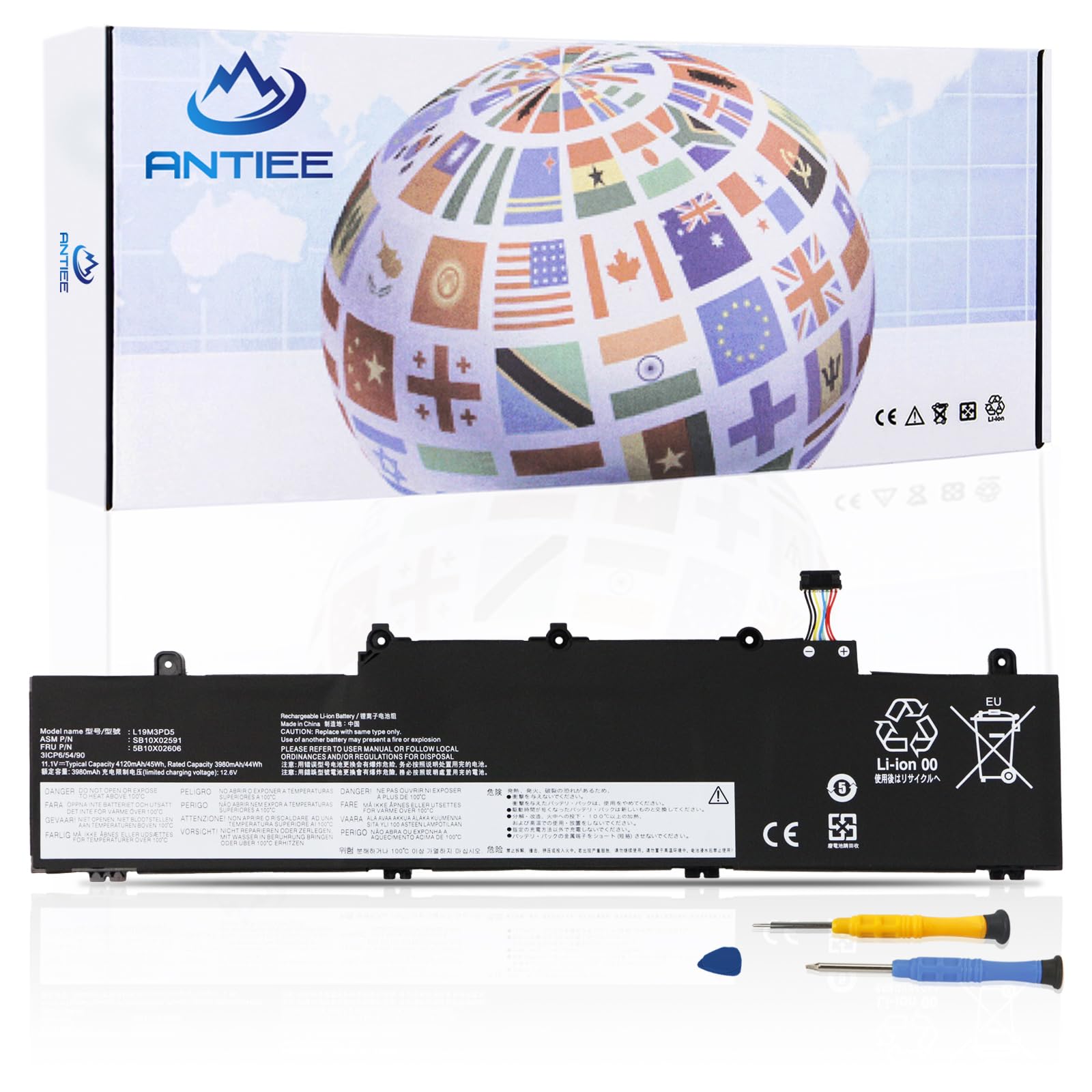
L19M3PD5 45Wh Laptop Battery Replacement for Lenovo ThinkPad E14 E15 Series | E14 Gen 2/ Gen 3/ Gen 4, E15 Gen 2/ Gen 3/ Gen 4 Series L19C3PD5($37.73Value)
$37.73
L19M3PD5 45Wh Laptop Battery Replacement for Lenovo ThinkPad E14 E15 Series | E14 Gen 2/ Gen 3/ Gen 4, E15 Gen 2/ Gen 3/ Gen 4 Series L19C3PD5($37.73Value)
Description
【Specification】Voltage: 11.34V . Capacity: 45Wh 4000mAh. Battery Type: Li-Polymer. Condition: Brand new, from high quality materials, top circuit boards and smart chip. 【Replace Part Number】 L19M3PD5 L19C3PD5 5B10X02600 SB10X02597 L19D3PD5 5B10X02594 SB10X02605 5B10X02606 SB10X02591 L19L3PD5 5B10X02603 SB10X02608 L20C3PD4 5B11C73245 SB11C73240 L20D3PD4 5B11C73242 SB11C73241 SB11E24664 L20M3PD4 5B11C73244 SB11C73243 L20L3PD4 5B11E24665. 【Compatible Laptop Models】Fit for Lenovo ThinkPad E14 Gen 2 (Type 20T6, 20T7, 20TA, 20TB) series; for Lenovo ThinkPad E14 Gen 3 (Type 20Y7, 20YD, 20YE, 20YF) series; for Lenovo ThinkPad E14 Gen 4 (Type 21EB, 21EC, 21E3, 21E4) series; for Lenovo ThinkPad E15 Gen 2 (Type 20TD, 20T8, 20T9, 20TE) series; for Lenovo ThinkPad E15 Gen 3 (Type 20YG, 20YH, 20YJ, 20YK) series; for Lenovo ThinkPad E15 Gen 4 (Type 21E6, 21E7, 21ED, 21EE) series 【ANTIEE Promise】Each products has undergone rigorous testing to ensure the correct voltage, circuit protection, stable current, low self-discharge and CE / FCC / RoHS Certified for safety. About 500 recharge cycles over the life. 【ANTIEE After-sales】12 months of warranty! Support: The return window will be closed a month after you received the the product. Contact us by email at any time, we will be more than glad to offer a perfect solution.
Specification:
Battery Type: Li-ion
Battery Condition: Brand New
Battery Voltage: 11.34V
Battery Capacity: 45Wh 4000mAh
Condition: Brand New
Battery compatible with the following models:
Lenovo ThinkPad E14 G2/G3 E14 Gen 2/Gen 3,Lenovo ThinkPad E15 G2/G3,E15 Gen 2/Gen 3 Series Notebook
Compatible with Part Numbers:
L19M3PD5 L19C3PD5 5B10X02600 SB10X02597 L19D3PD5 5B10X02594 SB10X02605 5B10X02606 SB10X02591 L19L3PD5 5B10X02603 SB10X02608 L20C3PD4 5B11C73245 SB11C73240 L20D3PD4 5B11C73242 SB11C73241 SB11E24664 L20M3PD4 5B11C73244 SB11C73243 L20L3PD4 5B11E24665
Please note that the battery must be fully charged before first use.
To install the battery, follow these steps:
1.Turn off your laptop and disconnect the power.
2.Turn the laptop over, install the new battery, and fix it with a tool.
3.After installing the battery, turn on the laptop first, and then plug in the power cord. If it fails to start up, please do not plug in the power cord.
4.If the computer cannot recognize the new battery, please try updating the BIOS settings. Alternatively, you can disconnect the old battery, hold down the power button for 20 seconds, and then connect the new battery.
5.When using the new battery, discharge it to 5% (not 0%) and then charge it to 95%. Repeat this cycle 3-4 times.
More Information
| Size | 11.5*2.9*0.35 L19M3PD5 |
| Mpn | L19M3PD5 |
| Age_group | ADULT |
| Condition | NEW |
| Gender | UNISEX |
| Product_category | Gl_electronics |
| Google_product_category | Electronics |
| Product_type | Electronics > Computers & Accessories > Laptop Accessories > Batteries |