
Business Dashboards Explained: Metrics, Tools, Use Cases
Most businesses collect a lot of data. Very few see it clearly. Reports sit in folders, numbers live in spreadsheets, and teams spend more time compiling data than using it. That gap is why business dashboards exist.
Business dashboards bring important data into one place and show it in a way people can understand quickly. They are not reports and they are not meant to explain everything. A good business dashboard answers one basic question: how are we doing right now.
This article explains what business dashboards are, how they are used, what metrics belong on them, and how business dashboard software supports real decision making.
What Business Dashboards Are Used For
Business dashboards are visual tools that display key metrics from across the business. They pull data from systems like sales tools, accounting software, or analytics platforms and show the numbers in charts, tables, or simple graphs.
The value of business dashboards is speed. Instead of opening five tools or waiting for a report, decision makers can see performance in minutes. That is why dashboards are used daily, not quarterly.
Teams rely on business dashboards to:
- Track progress toward goals
- Monitor ongoing performance
- Catch issues early
- Align teams on the same numbers
A business dashboard only works when it focuses on what matters. Showing everything defeats the purpose.
Also check: Employee Communication That Improves Teams and Productivity
Business Dashboards for Leadership and Teams
Different teams use dashboards differently. This is where many dashboards fail. One view is created for everyone, and it ends up helping no one.
Leadership teams usually need a high-level business dashboard. This view focuses on outcomes, not activity. Revenue, margins, growth trends, and major risks are common elements.
Managers rely on dashboards to understand execution. Their business dashboards include pipeline health, productivity metrics, or operational efficiency.
Individual teams often work from narrower dashboards that track day-to-day metrics tied directly to their responsibilities.
This is also where a business intelligence dashboard becomes useful.
Business Dashboards and Business Intelligence Dashboard Use
A business intelligence dashboard is built for analysis, not just monitoring. While a business dashboard shows what is happening, a business intelligence dashboard helps explain why it is happening.
Business intelligence dashboards allow users to:
- Filter data by time, region, or segment
- Compare performance across periods
- Drill into detailed views
- Spot patterns and trends
Most organizations use both. A simple business dashboard for regular tracking and a business intelligence dashboard when deeper questions come up.
Business Dashboard Metrics That Matter
Metrics decide whether a dashboard is useful or ignored. A business metrics dashboard should focus on a small set of numbers that reflect real performance.
Core metric categories
Most effective dashboards include metrics from a few key areas.
Financial
- Revenue growth
- Gross margin
- Operating costs
- Cash position
Sales and marketing
- Lead conversion rate
- Sales pipeline value
- Customer acquisition cost
- Average deal size
Operations
- Order fulfillment time
- Inventory turnover
- Capacity usage
- Error rates
Customer
- Retention rate
- Support response time
- Satisfaction score
- Repeat purchases
A business performance metrics dashboard does not try to cover all of these at once. It selects the metrics that connect directly to business goals.
You may also like: How Brands are Reinventing their Identity with AI Branding?
Business Dashboard Software and What It Supports
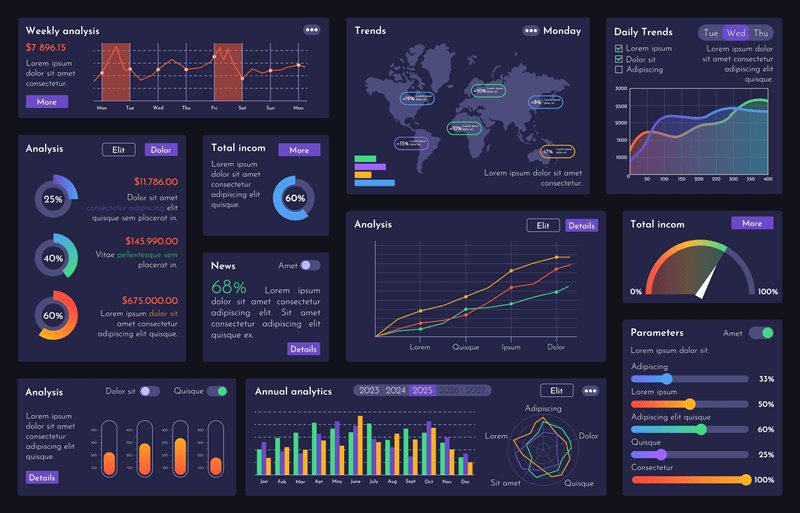
Business dashboard software is what makes dashboards possible. These tools connect data sources, process updates, and present the information visually.
The best business dashboard software does not require constant manual work. Data updates automatically and users can interact with the dashboard without technical help.
When evaluating business dashboard software, companies usually look at:
- Which data sources it supports
- How easy it is to update or customize
- Whether non technical users can use it
- How often data refreshes
- Access control and security
Some tools are built for simple reporting. Others support advanced business intelligence dashboard use with deeper analytics.
The tool matters less than adoption. If people do not trust the numbers or find the dashboard confusing, it will not be used.
Dashboard Business Examples in Practice
Seeing dashboard business examples makes the use clearer.
Sales dashboard example
A sales business dashboard typically tracks:
- Revenue against target
- Pipeline value by stage
- Win rates
- Forecast accuracy
Sales leaders use this to adjust priorities and manage risk before the quarter ends.
Finance dashboard example
Finance teams rely on dashboards for visibility into:
- Budget versus actual spending
- Profitability by product or department
- Outstanding receivables
- Cash flow trends
A finance-focused business intelligence dashboard allows deeper review by time period or cost center.
Operations dashboard example
Operations dashboards focus on execution:
- Daily output
- Order backlog
- On-time delivery rate
- Utilization levels
These dashboards support fast decisions when something falls out of range.
Each of these dashboard business examples shows how dashboards serve a specific purpose rather than trying to do everything.
How to Build a Business Performance Metrics Dashboard
Building a business performance metrics dashboard follows a simple process.
First, define the decision the dashboard supports. If the decision is unclear, the dashboard will be unfocused.
Second, select metrics that directly relate to that decision. Avoid adding metrics just because data exists.
Third, confirm data accuracy. A dashboard built on unreliable data loses credibility quickly.
Fourth, design for readability. Simple layouts, clear labels, and consistent definitions matter more than visuals.
Finally, review and adjust. Dashboards should change as priorities change.
More to Discover: 9 Lead Conversion Tips for Higher Conversion Rates
Final Takeaway: Common Problems With Business Dashboards
Many business dashboards fail for predictable reasons:
- Too many metrics
- Unclear ownership of data
- Inconsistent definitions across teams
- Dashboards built for appearance, not use
A dashboard should answer questions, not create new ones.
FAQs
What is the main purpose of business dashboards
Business dashboards are used to monitor key metrics in one place so teams can understand performance quickly and act without waiting for reports.
How does a business intelligence dashboard help compared to a standard dashboard
A business intelligence dashboard allows deeper analysis through filtering, comparisons, and detailed views, helping teams understand why performance changes.
How often should a business performance metrics dashboard be reviewed
Most business performance metrics dashboards are reviewed weekly or monthly, while operational dashboards may be checked daily depending on the use case.
Categories
- Arts & Entertainment 100
- Automotive 186
- Business & Professional Services 219
- Construction & Contractors 298
- Clothing & Accessories 76
- Community & Government 95
- Computers & Electronics 74
- Education 75
- Food & Dining 86
- Health & Medicine 186
- Legal & Financial 100
- Home & Garden 179
- Industry & Agriculture 105
- Media & Communications 44
- Personal Care & Services 73
- Real Estate 68
- Shopping 74
- Sports & Recreation 87
- Travel & Transportation 102
- Animals & Pets 11
- Arts 9
- Community 9
- Chain 607
- Computers & Internet 8
- Health Care 10
- Communication & Media 7
- Shopping & Retail 10
- Health & Beauty 9
- Education & Schools 8
- Financial & Legal Services 14
- Home & Office 13
- Lawyers & Legal Services 7
- Financial & Services 1